Decode Any Vehicle VIN & Get Details with Cheap CARFAX Report

Buying or selling a used car shouldn't feel like guesswork at all. Our VIN decoder aggregates reliable data from official databases like NHTSA. Enter your 17-character VIN and enjoy fast decoding with no forced signup or fees.

Decode VIN
Enter a 17-character Vehicle Identification Number to decode

Inside the Report

Everything Your VIN Reveals

Seven categories of data, decoded from a single 17-character string.

01

VIN Decode Status & Basic Identification

This section confirms the validity of the VIN and provides foundational details.

  • Decode Status: Confirms the VIN was processed correctly and the internal check digit is valid.
  • Error Information: Details any issues encountered during the VIN lookup process.
  • Vehicle Descriptor (Partial VIN): Displays the key parts identifying the manufacturer and vehicle type.
02

Core Vehicle Specifications

Get the essential facts about the vehicle's identity and build.

  • Make: Brand name (e.g., Honda, BMW, Chevrolet).
  • Model: Specific model (e.g., Civic, 3 Series, Silverado).
  • Model Year: The year the vehicle is designated as by the manufacturer.
  • Vehicle Type: Broad category (Passenger Car, Truck, Motorcycle).
  • Body Class / Style: Sedan, SUV, Coupe, Convertible, etc.
  • Doors: Number of doors on the vehicle.
  • Trim Level: Specific package or version (LX, M Sport, LTZ). Detail may vary.
  • Series: Manufacturer-specific model line grouping.
03

Manufacturing & Origin Details

Learn where and by whom the vehicle was built.

  • Manufacturer Name: Full official name of the company that built the vehicle.
  • Plant Country: Country where final assembly took place.
  • Plant City / State: Specific location of the assembly plant.
  • Plant Company Name: Name associated with the manufacturing facility.
04

Engine, Transmission & Drivetrain

Key technical details about the vehicle's powertrain.

  • Engine Cylinders: Number of cylinders (4, 6, 8, etc.).
  • Engine Displacement: Size in Liters, Cubic Centimeters, or Cubic Inches.
  • Engine Power: Output in Horsepower (HP) or Kilowatts (kW).
  • Engine Model / Code: Manufacturer's designation for the engine type.
  • Fuel Type: Gasoline, Diesel, Electric, Hybrid, plus secondary fuel.
  • Transmission Style: Automatic, Manual, CVT.
  • Transmission Speeds: Number of forward gears.
  • Drive Type: FWD, RWD, AWD.
  • Electrification Level: Hybrid, PHEV, or BEV.
05

Weight, Dimensions & Capacity

The vehicle's size and load capacity.

  • GVWR: Maximum safe operating weight including passengers and cargo.
  • Curb Weight: The weight of the empty vehicle.
  • Wheelbase: Distance between the front and rear axles.
  • Seating Capacity: Number of seats and seat rows.
06

Safety Equipment Information

Details on standard and potentially optional safety features.

  • Airbag Locations: Front, Side, Curtain, Knee.
  • Seat Belt Information: Type of seat belts installed.
  • Braking Systems: Presence of Anti-lock Braking System (ABS).
  • Stability Control: Electronic Stability Control and Traction Control.
  • TPMS: Tire Pressure Monitoring (Direct or Indirect).
  • Advanced Safety Systems: Backup Cameras, Collision Warnings, Lane Assist, Blind Spot.
07

Other Potential Data Points

Depending on the vehicle type, additional details might be included.

  • EV/Hybrid Battery Details: Information on battery type, voltage, or capacity (kWh).
  • Motorcycle/Bus/Trailer Specifics: Data unique to these vehicle types.

Important consideration: Some data fields might return as null or Not Applicable. This usually means the detail wasn't encoded in the standard VIN sections or wasn't reported by the manufacturer in the accessible database.

The Basics

What Is a VIN and Why Does It Matter?

A Vehicle Identification Number (VIN) is a unique code assigned to every car at manufacture. It's like a vehicle's fingerprint, containing details like where it was built, what engine it has, and what features it came with.

You can find the VIN:

  • 1 On the dashboard (driver's side, near the windshield)
  • 2 Inside the door jamb
  • 3 On your title, insurance, or license plate records

How It Works

How Our Free VIN Lookup Works

01

Locate your VIN

Find the 17-digit VIN on the dashboard, door jamb, or registration.

02

Enter the VIN

Paste it into the search box at the top of the page.

03

Get your report

Click Lookup to instantly see decoded specs from the NHTSA database.

Our VIN lookup reveals basic specs instantly. For more advanced details, like accident history or title problems, upgrade to a full Cheap Carfax VIN check starting at just $2.

Smart Buyers Never Skip VIN Decoding. Here's Why!

Are you buying a used car in the U.S.? VIN decoding is non-negotiable. This step protects you from costly mistakes and unpleasant surprises.

  • Accident history
  • Market value insights
  • Manufacturer specs
  • Ownership history
  • Exact year and model
  • Manufacturing country
  • Fuel type and drivetrain
  • Hidden damages & mileage
  • Key safety features
  • Safety recalls

What You'll Get with a VIN Number Check?

Depending on availability, your VIN check can include:

  • Year, make, model, and trim
  • Engine and transmission specs
  • Fuel type and drivetrain
  • Country and city of manufacture
  • Safety features and vehicle specs
  • Recall notices and registration state

We even support car VIN lookup for major brands like Ford, BMW, Chevy, Toyota, and more.

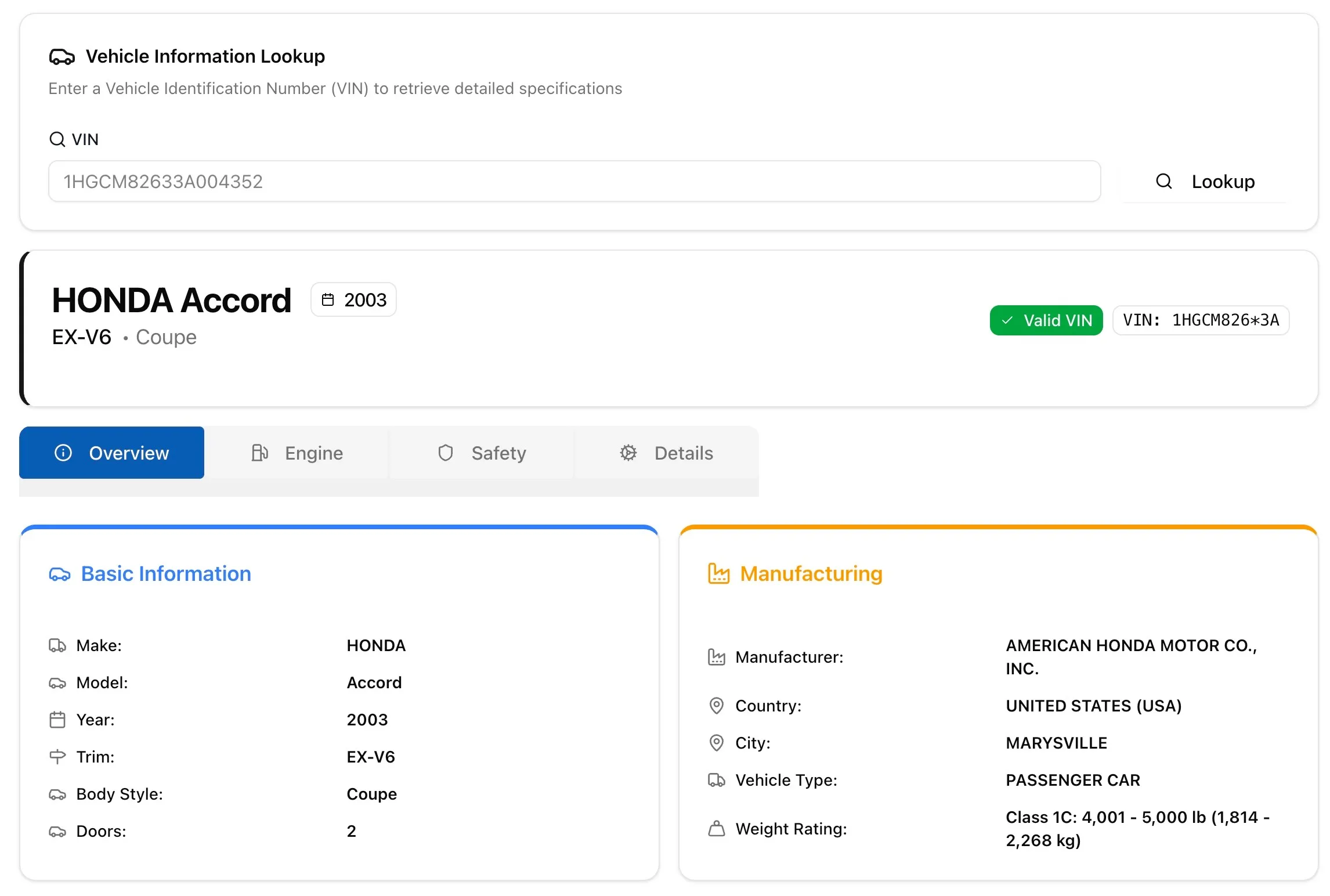
Here is an example:

VIN decoder on cheapcarfax.net of honda car

Quick Guide

Where to Find Your VIN (Quick Guide)

On the Dashboard

The VIN is placed under the windshield on the driver's side. Look from the outside through the windshield at the bottom, driver-side corner. It's usually stamped on the metal plate.

On the Door Jamb

When you open the driver's door, the VIN label is on the door itself or the inner doorjamb. This label also lists weight ratings, build date, and other details.

Need More Than Basic Info?

If you're buying a used car, a basic VIN decoder is just the start. You'll want a full vehicle history report.

  • Odometer readings
  • Accident or salvage records
  • Ownership and title transfers
  • Recall history and lien checks

Use our Cheap Carfax report tool as an alternative to unlock everything you need to know affordably.

Check out our other VIN decoders for popular brands such as Mercedes, Ford, and Porsche.

FAQ

FAQ

Where can I find my VIN number on my car?

Your VIN is usually located on the driver's side dashboard near the windshield, inside the driver's door jamb, or on your vehicle registration documents. It's a 17-character alphanumeric code. Once you find it, copy that and paste that above to decode your car VIN.

Can I do a free VIN check with this tool?

Yes! Our VIN decoder offers a free VIN lookup that provides basic vehicle specs like make, model, year, engine type, and more. For a detailed vehicle history report, you can upgrade for just $2.

What's the difference between a VIN lookup and a vehicle history report?

A VIN lookup shows factory specs like engine, trim, and build info. A vehicle history report includes past accidents, title status, ownership history, odometer readings, and more.

Can I use this for a license plate lookup?

Yes, we also support license plate lookups tied to VINs in some states. Just enter your VIN to begin; if available, you'll see linked plate info.

Do you support specific makes like BMW, Ford, or Toyota?

Absolutely. Our system supports BMW VIN decoder, Ford VIN lookup, Toyota VIN decoder, and many other brands, as long as the vehicle has a standard 17-character VIN.